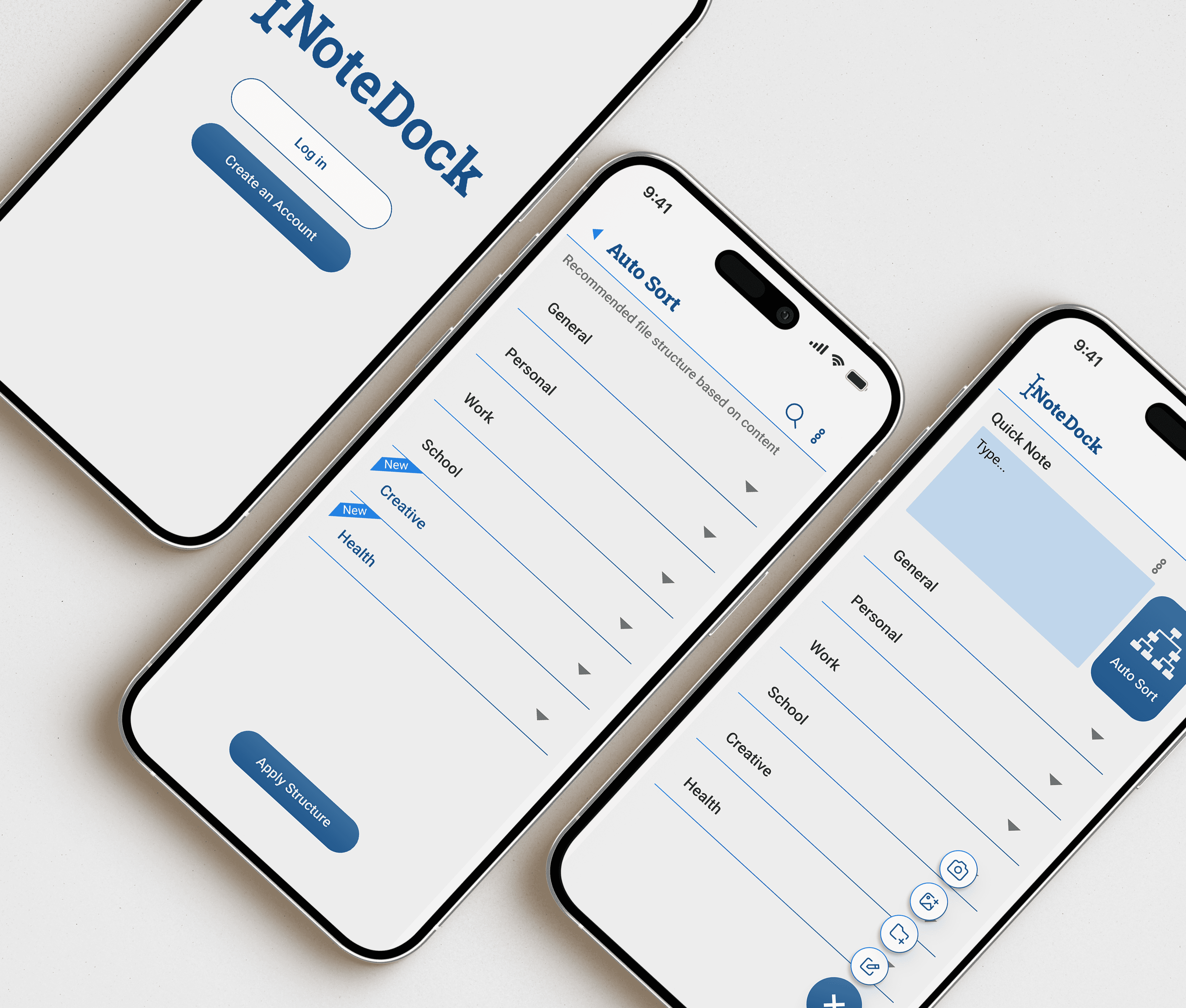
NoteDock
Mobile devices viewing the NoteDock prototype may experience lag or limited responsiveness. For optimal performance, please view this prototype on a desktop browser.
This capstone was assigned during my UX/UI certification course. It was a solo project that I made in tandem while learning the curriculum. Therefore, I made a lot of rookie mistakes and arrogant assumptions. As my first attempt at putting my UX/UI learnings in practice, I hope that showcasing my errors demonstrates that growth and learning is messy, not polished away.
Designed for Productivity
Organization takes effort. Productivity, note-taking, and journaling are not linear workflows. They are evolving “ecosystems” that constantly reshape as new information enters. Hence why organization is put on the back burner for most.
NoteDock began as an exploration into how people organize notes. This project explores how a workspace can reduce mental friction without forcing one method of structure.
"It takes longer to make the space feel right than to actually get my thoughts out." - PanPan
“I hate wasting time reformatting or hunting for something I know I already wrote down.” - Destiny
“I don’t want complex systems, I just need to catch the thoughts fast and move on.” - Ariel
Some people need structure for work. Some need freedom for creative projects. Most people need both.
Existing tools fall into extremes:
Minimal and rigid user flows that force hierarchy
Highly aesthetic tools that sacrifice function
Catch-all apps that offer no structure at all
Switching between tools just to meet different mental needs breaks focus. It becomes harder to see how work, life, memory, and creativity connect. I kept these problems in mind throughout ideation.
Research
I was curious how emotional and mental structures shape note-taking styles and workflows. I stumbled upon this finding which resonated with my early research:
“Organization fails not because structure is missing, but because imposed structure creates cognitive resistance.” - Bauer and Koedinger, Selection-Based Note-Taking Applications (2007)
This never sat right with me. The evidence was there, but there had to be more to it. I kept it in mind throughout my journey to challenge this finding. Through articles, studies, interviews, and empathy mapping, I synthesized two primary personas and the Jobs to Be Done associated with each.
The Workaholic
“If I don’t write it down now, I will forget. I take notes for survival.”
The Workaholic lives in a high-stakes environment where decision making and successful task execution is crucial. Their main job is to externalize their mental load to stay clear, focused and in control. They need reliability, low friction, and confidence in recall. Structure matters, but only if it does not slow them down.
The Builder
“I need a system I don’t have to fight to use.”
The Builder expresses their creativity through journaling, reflecting on their mental health, or adding a personalized touch to the mundane tasks in their lives. They use personalization as a cognitive strategy to express their inner world to assist in memory recall and make it meaningful. They need freedom to define their own structure, express creativity, and have an emotional outlet.
I identified a 3rd persona worth mentioning…
The Jotter: A pencil and paper enthusiast who relies on the physical act of writing to remember things and only transfers handwritten notes digitally if they have to.
This persona was present in the other two. Everyone writes by hand at times, but for different reasons. Because of this overlap, I narrowed the focus to two primary job performers with the clearest distinctions. The Jotter will become prevalent later in my journey.
Ideation
I began to question the organizational structure of existing apps provided. I did this to brainstorm new ways to provide alternates to solve that friction. I focused on how notes are captured, organized, and recalled. I observed whether structure was being introduced at the right moment. Through this process, I tested the following:
Ways to merge analog and digital behavior
Soften or remove rigid structure
Shift organizational responsibility away from the user
I honed into these three while brainstorming, I went with auto-sorting as the core of NoteDock. With the knowledge I had at the time, I knew barcodes and QR codes have the ability to map an upload to a destination. This was my first attempt at automating organization.

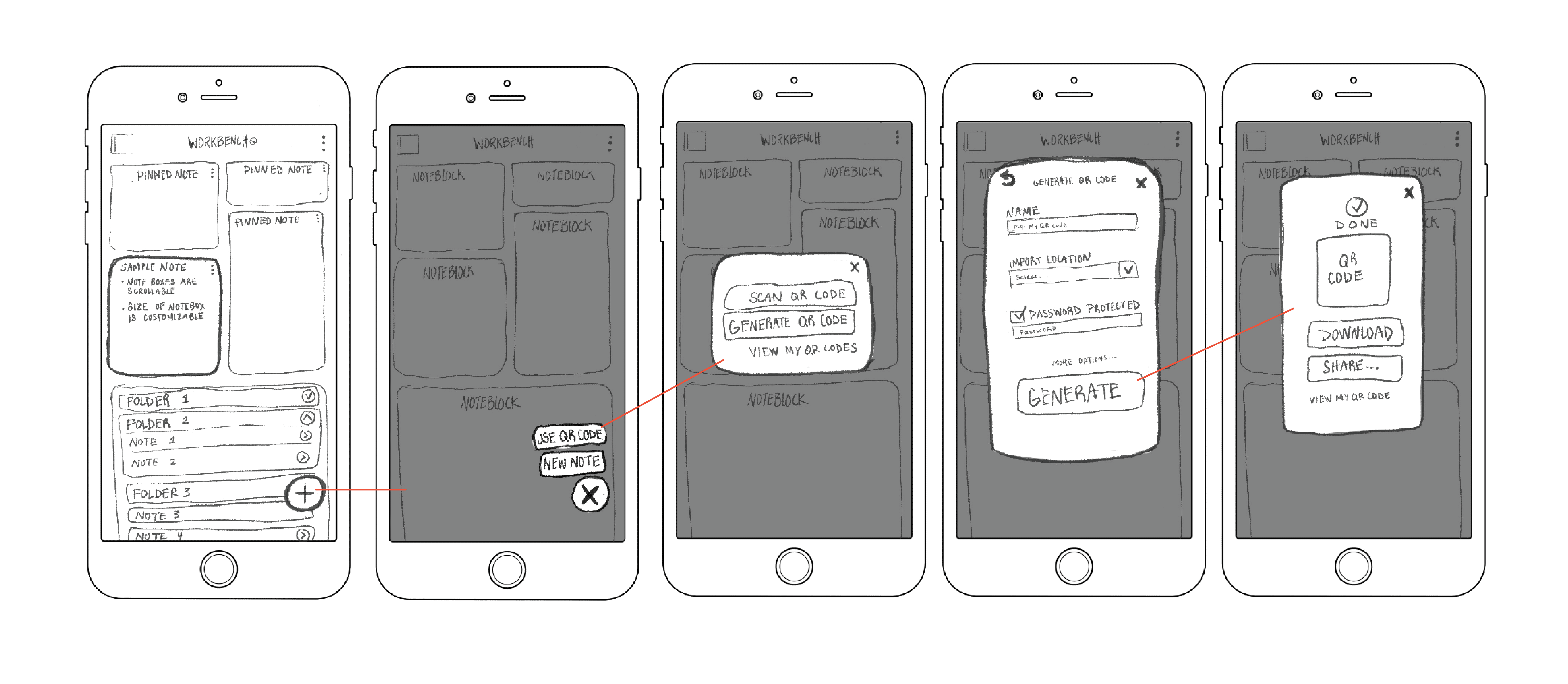
First Look
In my head, this was a solid way to automate organization. Although in practice, it introduced friction. If you’re confused, you’re not alone. Usability testing revealed:
Users did not understand why QR codes were needed
Many believed they had to prepare something before generating a QR code
The workflow asked users to think about structure at the wrong moment
The simple user flow worked, but the reasoning failed.
All participants ran into errors, took indirect paths, or needed clarification.
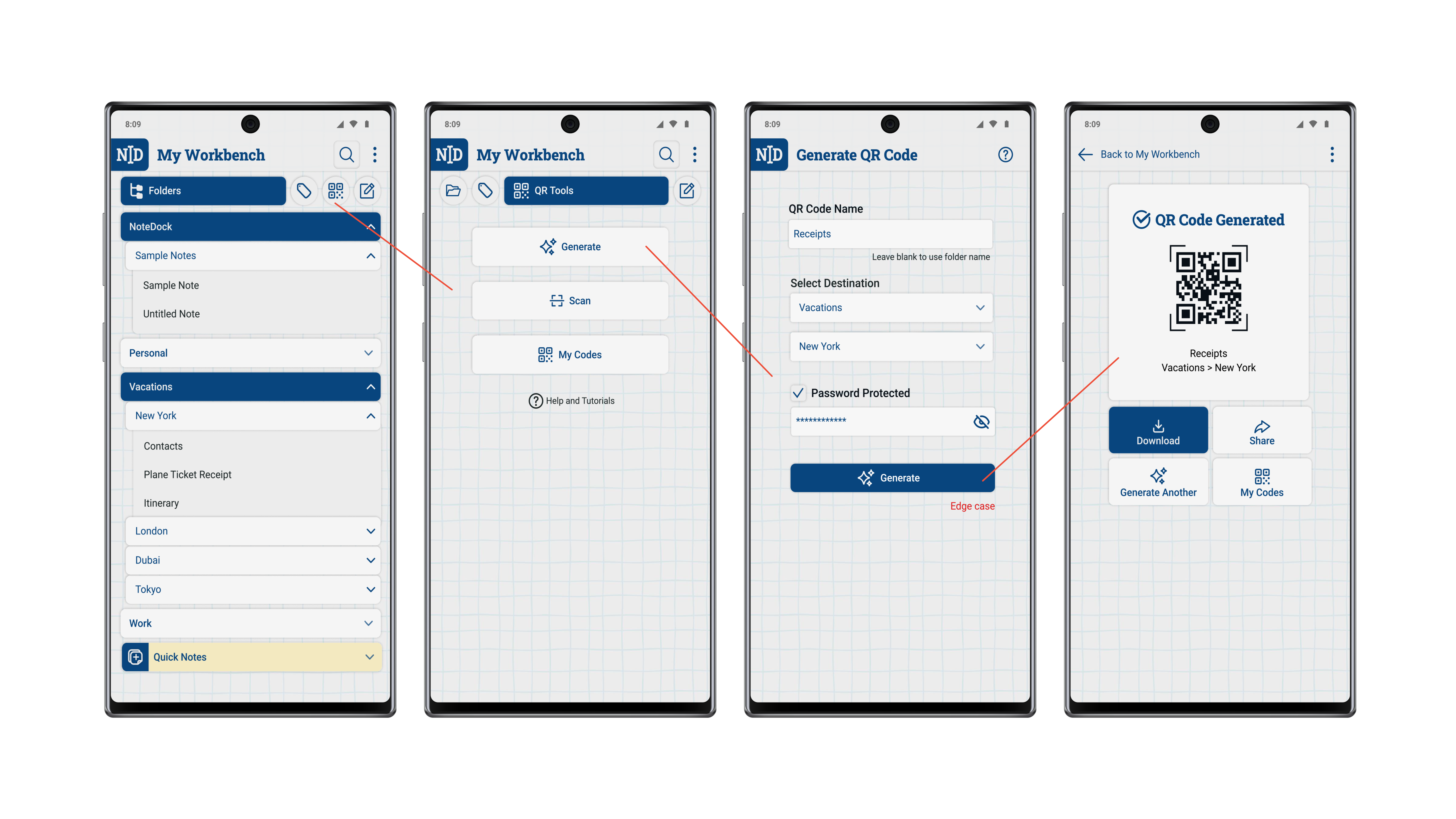
Pivot: AI Context Sorting
After running a second test after some tweaks, it became clear that users were asked to think about structure at the wrong moment. Preparation and cognitive friction were still present.
Which brought me back to ideation and came up with a new solution - Replace this QR code method with an AI sorting method.
Pardon my ignorance here. I initially assumed AI could only read text at a surface level, with no real understanding of context, and that it simply Frankenstained assets together with text and images based on keywords pulled from the web. After a quick google search, I was wrong to assume it can’t read full context.
If AI can already read images and text at a contextual level, it should be capable of using context to sort notes into a user’s existing folder. No QR codes needed.
I trashed the QR code structure and replaced it with an AI-driven workflow.
Enhanced Features
Not only will the AI auto sort new notes into existing folders, it will also provide suggestions on how your existing notes could be better organized. Sorting notes to more appropriate folders, recommend new folders, merging folders, ect.; all with the user’s consent, of course.
The New Experience
With the core function of NoteDock changed, converging meant back peddling. I had to reconsider my red routes, user flows, and wireframes. This change removed 18 screens, a 48.6% reduction. This was already a good sign.
New usability testing reveled:
Every user completed all tasks with a 100% success rate
Time observed for all participants to complete the tasks were significantly reduced to 4-7sec task completion
0 errors encountered. No one asked for clarification, or needed help finishing tasks
The idea of adding AI integration gave a sense of trust to the participants
The System’s Lifecycle
NoteDock evolves from organizing notes to modeling how the user thinks. So how does the system behave over time?
System Flow
Capture → Parse → Classify → Place → Feedback → Learn
Day 1 → Capture
Notes enter as raw input (image or text).
The system peruse content, assigns a category with a confidence level, and either auto-sorts or sends to Unsorted.
Users can accept or override.
Day 7 → Accumulation
As notes grow, the system identifies patterns and groups related content.
Structure is generated, not predefined.
User edits refine accuracy.
Day 30 → Retrieval + Patterns
Search becomes semantic.
The system surfaces connections, recurring topics, and relevant past notes.
A natural shift from storage to insight.
Design & Core Principles
Trustworthy. Seamless. Adaptive. Quiet. Clinical.
NoteDock is intentionally stripped down in this beta version. No widgets, workbench metaphors or decorative systems. Only capture, sort, assist.
NoteDock respects the value of handwriting while removing the burden of manual organization. The AI sits quietly in the background, auto-sorts when asked, and offers assistance when needed.
With NoteDock’s core function locked in, I was able to wrap up my branding.
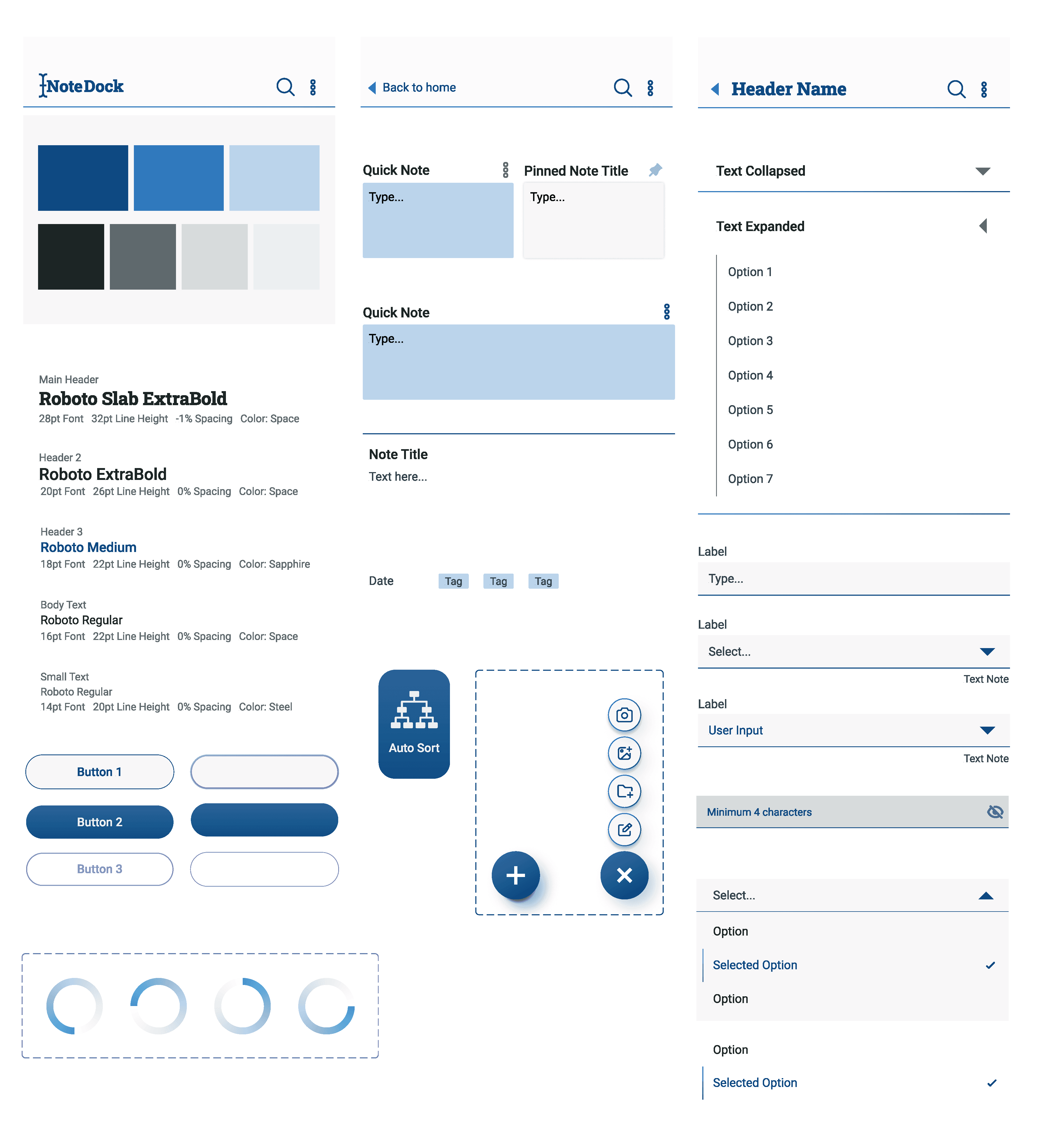
Conclusion
Let’s revisit this key finding from my early research.:
“Organization fails not because structure is missing, but because imposed structure creates cognitive resistance.” - Bauer and Koedinger, Selection-Based Note-Taking Applications (2007)
To elaborate further on Bauer and Koedinger’s statement, I discovered imposed structure fails when it is prompted too early, too rigidly, requires heavy maintenance, or without user control. Early versions of NoteDock demonstrated this clearly.
The shift to AI context sorting made the workflow “capture first, then organize for me.” NoteDock lifts the user’s organization efforts by offering that structure, but customized to your workflow. Structure is prompted on the user’s own time. It is personalized, not rigid, and assisting maintenance. All within the control of the user.
Next Steps
Further research investigating deeper into the claims above
Usability testing with different types of UX methods with a broader user representation
New task scenarios beyond note capture
Refining the UI to adhere to industry standard
Include new features like AI smart search, auto sort editing, and visual customization in the prototype
Observe how much a user trusts in the AI’s automatic sorting skills
Generally look deeper into how AI functions (this part, I’m highly interested in)